
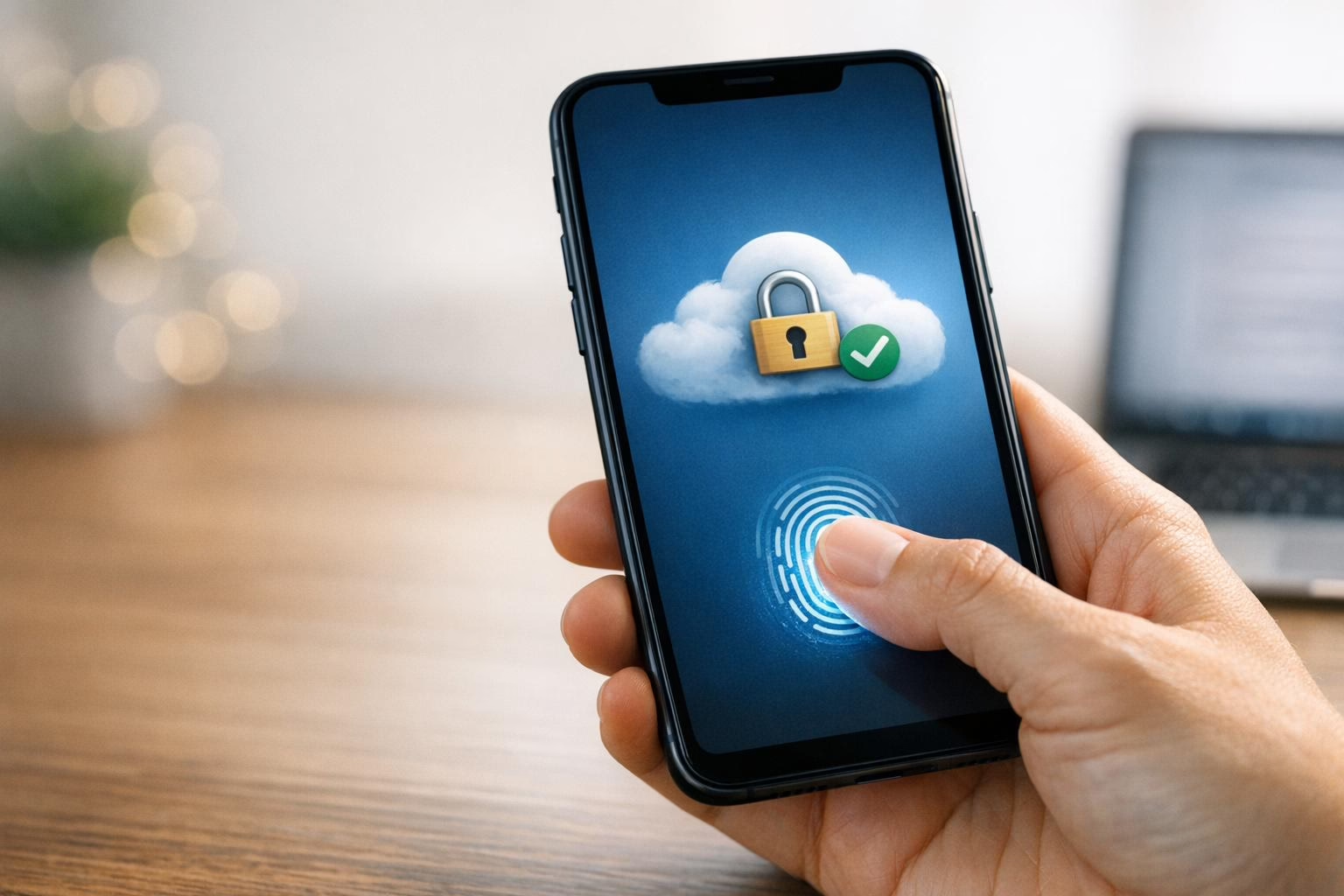
Biometric authentication is transforming cloud security by replacing passwords with physical traits like fingerprints or facial scans. This approach eliminates common cloud vulnerabilities like phishing and brute-force attacks and makes access faster and more secure. With multi-factor authentication (MFA) blocking 99.9% of automated cyberattacks, biometrics are becoming a key part of cloud protection strategies.
Key Takeaways:
- Passwords are outdated: 63.02% of businesses still use them despite their risks (theft, phishing, forgetting).
- Biometrics are harder to exploit: Traits like fingerprints can’t be guessed or stolen.
- Improved user experience: Logins are faster, reducing friction by up to 70%.
- Stronger security: Advanced features like liveness detection prevent spoofing.
To get started, ensure your systems support FIDO2/WebAuthn standards, secure biometric data with encryption, and test the rollout on non-critical accounts first. Biometric systems also integrate well with Identity and Access Management (IAM) tools for precise access control, aligning with Zero Trust principles.
For businesses, biometric access simplifies compliance, reduces IT support needs, and strengthens audit trails while protecting sensitive data. It’s a practical step toward modernizing cloud security.
How Biometric Access Improves Cloud Security
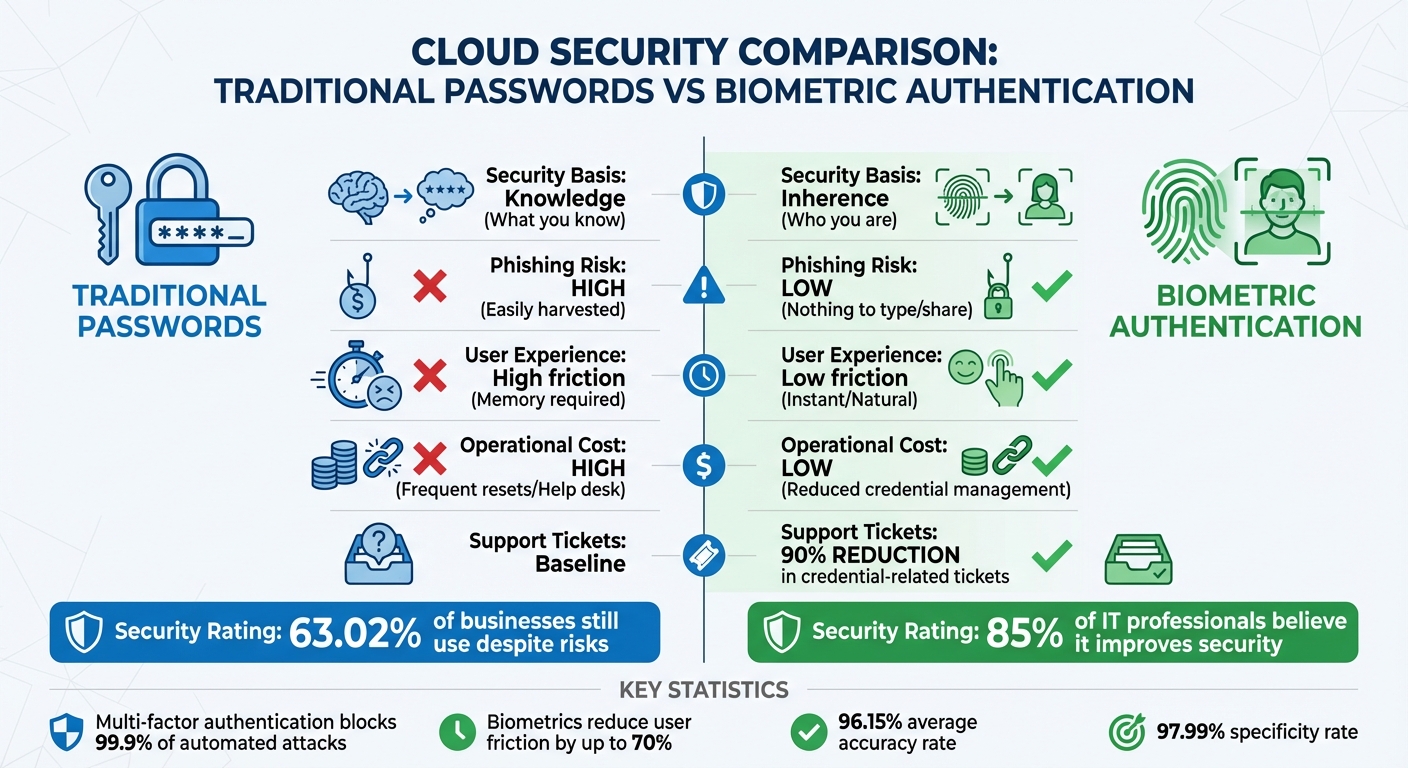
Biometric Authentication vs Traditional Passwords: Security and Performance Comparison
Biometric authentication is transforming the way we secure cloud environments by replacing traditional passwords with biological identifiers. This shift eliminates the vulnerabilities tied to passwords, such as phishing scams or fake login pages. Instead of relying on "what you know", biometrics focus on "who you are", offering a more secure and personalized approach.
Modern biometric systems have come a long way from basic fingerprint scans. They now include advanced features like liveness detection, which ensures the user is real by monitoring subtle actions like blinking or skin texture changes. These measures make spoofing attacks significantly harder. Companies that adopt passwordless biometric systems report up to a 90% drop in credential-related support tickets, and 85% of IT professionals believe biometrics improve security measures. This makes biometrics a powerful tool for enhancing access control, phishing protection, and login efficiency.
Protection Against Phishing and Password Theft
Biometrics are inherently more secure than passwords or PINs because they can’t be guessed, shared, or stolen through social engineering.
"Without passwords to enter, phishing attacks lose their effectiveness." – Sheena Ambarin, Content Marketing Specialist, JumpCloud
Biometric systems also move beyond traditional two-factor authentication methods like SMS codes. Instead, they use device-bound verification, which is instant and seamless. Multi-factor authentication, when combined with biometrics, blocks 99.9% of automated attacks. Some systems even go a step further by monitoring user behavior, such as typing patterns or swipe pressure, to detect unusual activity that might signal an account takeover.
Combining Biometrics with Role-Based Access Control
Biometric authentication works seamlessly with Identity and Access Management (IAM) systems like Active Directory. Once a user’s identity is verified through a fingerprint or facial scan, the system applies role-based permissions to determine which cloud resources they can access. This granular control aligns well with Zero Trust security principles, which require every user and device to be authenticated and authorized before gaining access.
Biometric data also enhances audit trails by tying actions to specific individuals rather than shared credentials. This ensures clear accountability. Additionally, when employees leave or change roles, their access can be immediately revoked, reducing risks like "privilege creep" and simplifying offboarding processes.
"Biometrics align perfectly with the zero-trust security model, where every user and device must be authenticated and authorized before accessing network resources." – Christopher Brown, Single Sign-on Expert
Faster Login Process and Better Audit Trails
Biometric authentication speeds up the login process, reducing user friction by up to 70% compared to traditional passwords. Instead of entering complex passwords or waiting for SMS codes, users can access multiple cloud applications with a single biometric scan, often integrated with Single Sign-On (SSO) solutions.
This speed advantage doesn’t compromise security. Every biometric login attempt creates a detailed record, showing exactly who accessed which resources and when. These logs are highly accurate, with research showing biometric systems achieve an average accuracy of 96.15% and a specificity rate of 97.99%. Such reliable audit trails are crucial for compliance with regulations like GDPR and CCPA.
| Feature | Traditional Passwords | Biometric Authentication |
|---|---|---|
| Security Basis | Knowledge (What you know) | Inherence (Who you are) |
| Phishing Risk | High (Easily harvested) | Low (Nothing to type/share) |
| User Experience | High friction (Memory required) | Low friction (Instant/Natural) |
| Operational Cost | High (Frequent resets/Help desk) | Low (Reduced credential management) |
Preparing Your Cloud Infrastructure for Biometric Authentication
Before diving into biometric authentication, it’s crucial to verify that your cloud systems meet the necessary technical requirements. Start by confirming that your cloud platforms and Identity Providers (IdPs) support FIDO2 and WebAuthn standards, as these enable secure public-key cryptography for biometric logins. Additionally, ensure your systems allow custom authentication flows and can store public-key credentials effectively.
You’ll also need to audit employee devices – both computers and mobile devices – to confirm they’re compatible with platform authenticators like Windows Hello, Touch ID, or Face ID. The table below outlines browser compatibility with FIDO2/WebAuthn across various operating systems:
| Web Browser | macOS 10.15+ | Windows 10 | Linux | iOS 14.5+ | Android 7+ |
|---|---|---|---|---|---|
| Chrome | Yes | Yes | Yes | Yes | No |
| Safari | Yes | No | No | Yes | No |
| Edge | Yes | Yes | No | Yes | No |
| Firefox | Yes | Yes | No | Yes | No |
The following sections will guide you through reviewing your current systems, securing biometric data, and making necessary hardware and software updates.
Reviewing Your Current Cloud Systems
When rolling out WebAuthn, it’s essential to set up custom domains beforehand. Changing the domain later can disrupt user enrollments due to origin binding. Check whether your cloud provider offers Web APIs or SDKs that can connect biometric capture tools to your backend systems seamlessly.
If you operate in a regulated industry, determine if your biometric hardware must meet certifications like FIPS-140-2 or FIPS-140-3. To avoid surprises, consider engaging a Managed Service Provider to conduct a thorough analysis of your IT and network infrastructure. This step can help identify any compatibility issues early on and ensure a smooth integration process. Once compatibility is confirmed, the next priority is securing biometric data storage.
Setting Up Secure Biometric Data Storage
After verifying compatibility, the focus shifts to protecting biometric data. Use Trusted Execution Environments (TEEs) to safeguard sensitive information during processing. In a typical WebAuthn flow, the private key remains on the physical device’s authenticator, while the cloud only stores a base64-encoded public key and a credential identifier – not the actual biometric data.
"A TEE is an environment for executing code, in which those executing the code can have high levels of trust in that surrounding environment, because it can ignore threats from the rest of the device." – Deepak Gupta
To further enhance security, store mathematical templates instead of raw biometric images. Encrypt all data at rest using AES-256 and protect data in transit with TLS 1.3. These measures help you meet compliance requirements while ensuring robust data protection.
Determining Required Hardware and Software Updates
To support biometric authentication, verify that client devices have built-in biometric sensors or are compatible with external security keys. For Windows environments, ensure devices are equipped with TPM 2.0 and that operating systems are updated to Windows 10 version 21H2 or later, or Windows 11.
If you use a hybrid cloud with on-premises domain controllers, update them to Windows Server 2016 or newer to enable Cloud Kerberos Trust. This setup allows cloud-connected devices to access on-premises resources without syncing public keys or issuing user certificates, reducing complexity. For custom applications, integrate biometric SDKs or Web APIs to connect physical scanners with cloud-hosted databases. These updates lay the groundwork for a secure and efficient biometric authentication system in the cloud.
How to Implement Biometric Access in Your Cloud Environment
Integrating biometric authentication into your cloud platforms requires a phased approach to secure key accounts while ensuring smooth operations.
Setting Up Biometric MFA for Administrator Accounts
Begin by securing your most critical accounts. For platforms like Azure, you’ll need the appropriate Microsoft Entra ID P1/P2 licenses to configure Conditional Access policies. In AWS, create a JSON policy that restricts all actions except those needed for users to manage their own MFA credentials until they authenticate with MFA. Administrators should access their "Security Credentials" or "My Profile" page to assign an MFA device, such as a passkey or security key.
When a biometric scan – like a fingerprint or facial recognition – is performed, the browser’s WebAuthn API generates a public-private key pair. Only the public key is stored by your cloud provider, ensuring enhanced security. For programmatic or high-privilege access, configure roles that require the aws:MultiFactorAuthPresent: true condition before granting access.
"Your password doesn’t matter, but MFA does! Based on our studies, your account is more than 99.9% less likely to be compromised if you use MFA." – Alex Weinert, Director of Identity Security, Microsoft
To prevent being locked out during system failures, always maintain at least one "break-glass" or emergency access account that is excluded from MFA policies. This ensures you can still access critical systems during unexpected outages.
Creating Risk-Based Authentication Rules
Risk-based authentication uses signals like user identity, device status, geographic location, and network behavior to automate access decisions. For example, if a user’s risk level is flagged as "high", the system can require biometric MFA along with a password reset. Credential strength tiers can also be defined: basic logins with passwords might allow access to non-sensitive apps, while sensitive data requires biometric verification or hardware security keys.
Before enforcing these rules, enable them in "report-only" mode to understand their impact without affecting users. Use clear naming conventions, such as "CA01 – All Users – MFA for Sensitive Apps", to keep policies organized and manageable. Keep in mind that Microsoft Entra ID limits organizations to 195 Conditional Access policies per tenant, so structure your rules thoughtfully.
For environments requiring high security, disable features that allow users to "trust" devices for extended periods. This ensures biometric challenges are presented at every login. As with other policies, emergency access accounts should remain excluded to avoid complete lockouts.
Once these policies are defined, test and refine them before proceeding with full deployment.
Testing and Rolling Out Biometric Systems
Roll out biometric systems gradually to minimize disruptions. Start with a 2-week pilot involving IT staff to identify potential issues. Next, extend testing to non-critical teams, followed by critical teams, aiming to complete the rollout within 8 weeks.
To accommodate users whose devices don’t support biometrics or in case of hardware failures, offer alternative authentication methods. These can include email magic links, backup codes, or FIDO2 security keys. Self-service enrollment portals can also empower users to manage their own biometric devices, reducing the workload for managed security services teams. Support these efforts with training materials like quick-start guides, video tutorials, and FAQs to help non-technical staff during the transition.
For facial recognition systems, recommend that users enroll without masks to establish the best baseline, even if the system allows mask-wearing during future logins. Strengthen security by configuring servers to verify that authentication requests originate from expected domains, and use authenticator signature counters to detect and block cloned hardware devices.
sbb-itb-ce552fe
ESI Technologies‘ Biometric and Cloud Security Solutions

Biometric Access Control Systems from ESI Technologies
ESI Technologies offers advanced biometric systems that integrate seamlessly with cloud platforms using secure APIs and SDKs. These systems support various modalities, including fingerprint, facial recognition, and iris scanning, ensuring flexibility for different security needs. To protect sensitive information, biometric data is encrypted both during transmission and while stored. Instead of retaining raw biometric data, ESI employs masking techniques to convert this information into hashed templates. This approach makes it nearly impossible to reverse-engineer the original data without proper authorization.
The company’s hybrid deployment model enables administrators to manage user permissions remotely while maintaining full control. This setup combines on-premises and cloud storage, offering a balance between enhanced security and scalability. Expert teams handle the installation process, ensuring smooth integration of biometric hardware with existing systems like surveillance cameras and alarm protocols.
Once installed, ongoing oversight is critical to ensure the system remains secure and functional.
24/7 Monitoring and Real-Time Alert Services
To safeguard biometric access systems, ESI Technologies provides round-the-clock monitoring paired with real-time alerts. These systems continuously track authentication logs and flag suspicious activities, such as failed biometric matches, unusual login attempts, or potential man-in-the-middle attacks. Secure API gateways regulate data flow, while routine audits are conducted to address vulnerabilities.
When anomalies like replay attacks occur, the system acts immediately. It sends alerts, locks compromised accounts, and enforces secondary verification measures to prevent unauthorized access. All access events are meticulously logged, complete with timestamps and user details, creating an audit trail that supports compliance and security reviews.
These proactive measures ensure system uptime and adaptability across various industries.
Industry-Specific Security Solutions
ESI Technologies enhances its security offerings by tailoring solutions to meet the unique demands of different industries.
- Healthcare facilities benefit from HIPAA-compliant encrypted storage and role-based access controls, ensuring only authorized personnel can access sensitive patient records or restricted clinical areas.
- Financial institutions are provided with hybrid models that include zero-knowledge biometrics and adjustable false acceptance rates to align with strict regulatory requirements.
- In retail settings, facial recognition systems with risk-based authentication rules enhance point-of-sale security, reducing phishing incidents by 40%.
- Manufacturing clients leverage iris scanning technology integrated with attribute-based encryption to protect sensitive supply chain data.
All solutions incorporate compliance measures for regulations such as GDPR and CCPA, including features like revocable templates and strict consent management policies.
| Industry | Security Focus | Tailored Solution Features |
|---|---|---|
| Healthcare | Patient data protection | HIPAA-compliant storage, restricted access to medical records and clinical areas |
| Corporate | Data and asset protection | Employee access management for offices, data centers, and secure zones |
| Municipalities | Public safety | Controlled access to emergency response centers and critical infrastructure |
| Retail | Transaction security | Facial recognition with risk-based rules for POS systems |
| Manufacturing | Supply chain integrity | Iris scanning with attribute-based encryption for sensitive data |
Maintaining and Monitoring Your Biometric Systems
Once your biometric system is up and running, keeping it secure and effective requires constant attention. Regular monitoring and timely updates to your policies are essential to addressing potential risks and maintaining system integrity.
Performing Regular Security Reviews
Security reviews are like routine check-ups for your biometric system – they help catch issues before they become major problems. Regular audits, including penetration testing and simulated attacks, are critical for identifying weaknesses and assessing system performance. Keep an eye on false positive and negative rates to ensure the system accurately validates only authorized users.
"Biometric systems should be regularly updated with the latest software and firmware updates to address security vulnerabilities and ensure that the system is operating at peak performance." – Mike Costello, Content Editor for Cybersecurity at Solutions Review
Using network monitoring tools to scan authentication logs for unusual activity is another smart move. These tools can help flag suspicious behavior tied to biometric data. The insights gained from these reviews can guide updates to your policies, keeping you a step ahead of potential threats.
Updating Security Policies for New Threats
Cyber threats are constantly evolving, so your security policies need to keep pace. Regularly update your system’s software and firmware to address new vulnerabilities. Unlike passwords, biometric data can’t simply be "reset" if compromised, making it even more important to stay ahead of security risks.
Vendor management plays a big role here, too. Review contracts with third-party providers to ensure they include strong security requirements and indemnification clauses. Additionally, adopt strict data retention policies – delete biometric data when it’s no longer needed. For added security, store biometric data separately from other personal information to reduce exposure in case of a breach.
As your policies adapt, prioritize compliance with privacy regulations to protect both your organization and the individuals whose data you handle.
Meeting Data Privacy Requirements
Handling biometric data comes with serious privacy responsibilities. Regulations like GDPR and CCPA demand that organizations process only the biometric data they truly need. The Information Commissioner’s Office (ICO) emphasizes:
"’Appropriate’ is a higher bar here than for personal information more generally. This is due to the sensitive nature of biometric data and the risks associated with it falling into the wrong hands."
To meet these high standards, practice data minimization and define clear retention periods for biometric information. Use Privacy Enhancing Technologies to balance privacy with system accuracy. Ensure biometric templates are irreversible, unlinkable across systems, and renewable without requiring fresh samples. Automated tools can help maintain compliance with frameworks like NIST and HIPAA by streamlining reporting and keeping detailed audit records.
Conclusion
Biometric authentication is transforming the way businesses secure their cloud environments. Unlike passwords, which can be stolen or shared, biometric identifiers such as fingerprints, facial patterns, and iris scans are entirely unique to each person – making them nearly impossible to replicate or misuse. This uniqueness provides a higher level of accuracy and reliability, addressing many of the weaknesses associated with traditional credentials.
Beyond improving security, biometrics also simplify everyday operations. They make logging in faster, enhance audit trails, and reduce administrative headaches. As Jackie Edwards, an expert in IT and software development, puts it:
"Biometrics are the wave of the future for cloud computing".
Cloud-based solutions also scale efficiently and often reduce costs thanks to SaaS pricing models.
To implement biometric authentication effectively, businesses must review their systems, encrypt sensitive data, and set risk-based rules. Once these steps are in place, ongoing monitoring and regular policy updates are critical to stay ahead of new threats and maintain compliance with privacy regulations like GDPR and CCPA.
ESI Technologies offers a range of biometric access control systems to help businesses across various industries secure their operations. Their solutions include biometric and keycard authentication, mobile-enabled access management, and 24/7 monitoring with real-time alerts. By combining advanced biometrics with expert installation and support, ESI Technologies ensures robust cloud security tailored to your needs. With their certified technicians handling the technical complexities, you can focus on what matters most – growing your business.
Take the next step in securing your cloud environment with biometric authentication. Visit ESI Technologies to explore their solutions and protect your business today.
FAQs
Where is my biometric data stored with FIDO2/WebAuthn?
With FIDO2/WebAuthn, your biometric data stays safe on your device instead of being stored on a server. Authentication relies solely on cryptographic proof, meaning your biometric templates are never transmitted or stored in a central location. This method boosts security while keeping your sensitive information protected.
What if my device doesn’t support biometrics or the sensor fails?
If your device doesn’t support biometrics or the sensor isn’t working, it’s worth setting up alternative security measures like multi-factor authentication (MFA) or other access controls. To keep access secure, make sure your system includes reliable backup methods. For a smooth and secure setup, consider consulting security experts who can help you plan and implement these alternatives effectively.
How do biometrics work with Zero Trust and role-based access?
In a Zero Trust setup, biometric verification plays a key role by continuously authenticating users through unique physical traits such as fingerprints, facial recognition, or voice patterns. When paired with role-based access controls, this approach ensures that only the right individuals can access specific resources. This reduces reliance on trust assumptions and strengthens overall security.